





Description
Product Introduction & Engineering Value
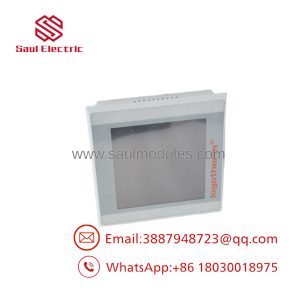
The Eaton 148576 XV-152-D4-84TVRG-10 is an XV-152 series operator interface designed for industrial machine and process-control applications. It combines a graphical display with touchscreen operation, allowing operators to monitor process values, acknowledge alarms, and interact with control functions from a local panel.
For replacement work, the complete Eaton catalog number and XV-152 model designation should be preserved. HMI replacements also require attention to the existing application project, communication protocol, display configuration, and mounting arrangement—not just the physical panel dimensions.
Technical Specifications
| Parameter | Specification |
|---|---|
| Manufacturer | Eaton |
| Catalog Number | 148576 |
| Model | XV-152-D4-84TVRG-10 |
| Product Family | XV-152 |
| Product Type | Operator Panel / HMI |
| Display Type | Color TFT display |
| Display Size | 5.7 in |
| Operator Input | Touchscreen |
| Application | Industrial machine/process control |
| Enclosure Installation | Panel-mounted |
| Communication | Dependent on configured interface |
| Application Software | Dependent on project configuration |
Engineering note
The exact communication interfaces, memory, supply requirements, display resolution, environmental ratings, and software compatibility should be verified against Eaton documentation for catalog number 148576. Do not assume that every XV-152 variant has the same electrical or communication specification.
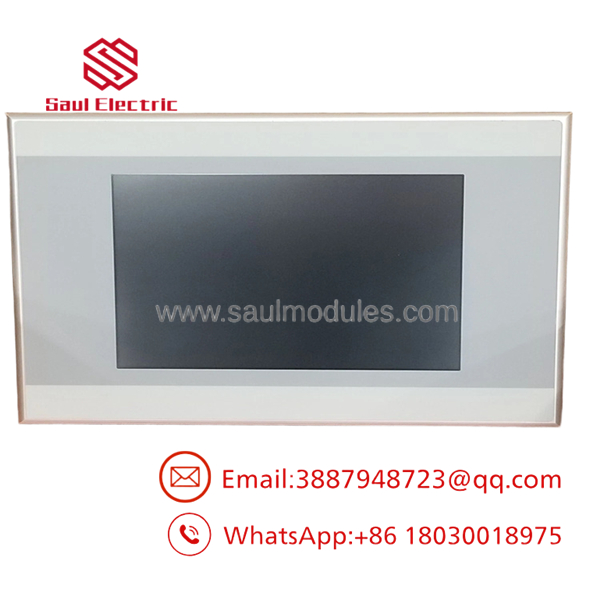
148576 XV-152-D4-84TVRG-10
Field Application & the “Trench” Experience
HMI replacement problems are rarely limited to the screen itself.
A production machine can have a perfectly functional PLC but remain difficult to operate because the replacement HMI does not contain the original project, uses a different communication configuration, or cannot establish the expected connection with the controller.
For 148576 XV-152-D4-84TVRG-10, the maintenance team should preserve the existing HMI project and communication settings before removing the old unit. Record PLC addresses, communication parameters, screen configuration, passwords where authorized, and any project backup available from the engineering workstation.
Specific application scenarios
- Machine operator stations for monitoring production status and controlling machine sequences.
- Packaging and material-handling equipment requiring local touchscreen visualization.
- Process-control panels where operators need alarm displays, setpoint entry, and equipment status information.
Transparency SOP: QA & Testing
For New Surplus 148576 XV-152-D4-84TVRG-10, inspection should proceed in this order:
- Catalog-number verification — Confirm both
148576andXV-152-D4-84TVRG-10. - Display inspection — Check the touchscreen surface for scratches, cracks, pressure marks, or dead areas.
- Housing inspection — Examine the bezel, mounting points, connectors, and rear enclosure.
- Power-up test — Where appropriate equipment is available, verify startup and display operation.
- Touch test — Check representative areas of the touchscreen for proper response.
- Communication test — If the appropriate controller or test environment is available, verify the applicable communication interface.
- Project verification — Confirm whether the supplied unit contains an application project or is supplied as hardware only.
Procurement warning: A New Surplus HMI may be unused hardware without the customer’s original application software. Treat hardware condition and project availability as separate purchasing requirements.
The Veteran’s Tech Trap Guide
⚠️ Trap #1 — Assuming the replacement contains the machine project
It may not. The HMI hardware and the customer’s application project are separate items. Secure a project backup before taking the existing operator panel offline.
⚠️ Trap #2 — Matching only the screen size
A 5.7-inch HMI with a similar cutout is not necessarily a valid replacement. Confirm the complete catalog number, communication hardware, power requirements, and software compatibility.
PRO TIP: Photograph the existing HMI’s rear label before removal. Record every connected cable and connector location. Then capture the communication settings from the engineering software.
⚠️ Trap #3 — Forgetting communication configuration
The PLC may be healthy, yet the replacement HMI can remain offline because of an incorrect address, protocol setting, cable connection, or project configuration.
Dynamic FAQ
What is Eaton 148576 XV-152-D4-84TVRG-10?
It is an Eaton XV-152 series touchscreen HMI/operator panel, catalog number 148576, intended for industrial machine and process-control applications.
Is the 148576 a PLC?
No. It is an operator interface/HMI rather than a PLC CPU. It provides visualization and operator interaction with the underlying control system.
Does a replacement HMI include the original application?
Not necessarily. New Surplus hardware may be supplied without the customer’s machine-specific project. Confirm project availability separately with the supplier.
What should I verify before ordering?
Confirm the 148576 catalog number, complete XV-152 model designation, display configuration, mounting requirements, communication interface, power requirements, and compatibility with the existing HMI project.
Can I install it without changing the PLC program?
Potentially, if the replacement has the same hardware and communication configuration and the original HMI project is correctly restored. This must be verified against the actual machine configuration.
How should New Surplus condition be verified?
Request photographs of the actual HMI, including the front display and rear identification label. Ask whether it has been powered and touchscreen-tested, and confirm whether application software is included.
What warranty should I request?
Warranty terms depend on the supplier and inventory condition. For a production-critical HMI, confirm the warranty period, testing performed, software/project status, and return provisions before purchase.

 Start Chat


