





Description
Key Technical Specifications
| Parameter | Specification / Value |
| Form Factor | 6U single-slot Eurocard configuration (Fits standard 4HP width) |
| Processor Variants | Intel Pentium M @ 1.1 GHz, 1.4 GHz, 1.6 GHz, or 1.8 GHz |
| L2 Advanced Cache | 1 MB (1.1 GHz option) or 2 MB (1.4 GHz, 1.6 GHz, and 1.8 GHz options) |
| System Chipset | Intel 855GME Graphics Memory Controller Hub + Intel 6300ESB I/O Hub |
| System Memory | Up to 1.5 GB DDR SDRAM (1.0 GB via 200-pin SODIMM + 512 MB optional factory solder-in) |
| VMEbus Core Interface | Tundra Universe II bridge chip |
| VMEbus Transfer Modes | A32/A24/D32/D08(EO)/MBLT64/BLT32 (DTB Master/Slave capability) |
| On-Board Storage Interface | Secondary IDE port supporting up to 2 GB bootable CompactFlash; SATA via P2 |
| Network Controllers | 1x Front Panel 10/100BaseTX (Intel 82551ER) + Dual Gigabit 10/100/1000BaseT (Intel 82546EB) |
| Expansion Capability | One 3.3 V / 5 V signaling IEEE 1386.1 PMC site (PCI-X, 66 MHz) |
| Nonvolatile Memory | 32 KB on-board NVRAM (data retained without system power applied) |
| Video Interfaces | Integrated SVGA (front panel DB15) + DVI-D dual-head support (routed to rear P2 I/O) |
| Front Panel Ports | 2x USB 2.0, 1x RJ45 (COM1), 1x RJ45 (10/100 LAN), 1x RJ45 (Gigabit LAN), 1x PS/2 Keyboard/Mouse |
| Power Consumption | +5 VDC (±5 percent), 7.28 A typical / 9.1 A maximum (for 1.8 GHz configurations) |
| Cooling Requirement | Passive onboard aluminum heat sink; requires minimum 450 LFM continuous forced rack airflow |
Product Introduction
The GE Fanuc VMIVME-7807 (V7807RC) is an industrial-grade, single-slot 6U VMEbus Single Board Computer (SBC) built around the thermally efficient Intel Pentium M processor family and the Intel 855GME chipset. Engineered as a high-performance alternative to power-hungry architectures, this board operates as a complete x86 system dual-ported directly to the VME backplane via a Tundra Universe II bridge. It supports up to 1.5 GB of DDR SDRAM with optional Error-Correcting Code (ECC) to prevent soft memory faults during continuous execution.
Designed to handle data-intensive I/O pipelines, the VMIVME-7807 features an integrated PCI-X 66 MHz PMC expansion site alongside dual Gigabit Ethernet pathways with optional VITA 31.1 packet switching. This board is widely chosen by systems integrators for military simulation, medical imaging, and real-time factory automation retrofits, offering native software compatibility with legacy operating systems like Windows XP, Windows 2000, QNX, VxWorks, and embedded Linux distributions.
Troubleshooting Quick Reference
| Symptom | Possible Cause | Relevance to this Part | Quick Check Method | Recommendation |
| Front panel SYSFAIL LED remains continuously lit red | BIOS initialization crash, un-seated SODIMM card, or power supply undervoltage | ✅ High | Measure the incoming voltage at the rack test points. Pull the module out and inspect the 200-pin SODIMM latching arms. | Clean the memory socket pins with compressed air. Reinstall the board. If the LED does not clear within 5 seconds of boot, the CPU or Universe II bridge has failed. |
| System fails to boot from the CompactFlash card slot | Master/Slave IDE assignment conflicts or invalid boot priority settings in BIOS | ✅ High | Enter the BIOS setup utility during boot via terminal or front panel keyboard. Verify if the CompactFlash drive is recognized under the secondary master IDE channel. | Set secondary master as the primary boot choice. Ensure the CompactFlash module formatting complies with standard FAT16/FAT32 or real-time OS partition boundaries. |
| The SBC randomly resets or drops off the VME bus during intensive processing tasks | Thermal shutdown triggered by insufficient chassis fan extraction | ✅ High | Check the physical temperature of the aluminum block heat sink immediately after a crash. Verify rack fan airflow is >450 LFM. | Ensure adjacent VME slots are populated with dummy cards or baffles to direct air directly over the 7807 heat sink. Re-verify the rack fan output. |
| Front panel USB 2.0 or serial ports are completely unresponsive | Blown onboard surface-mount micro-fuses due to field sensor short circuits | ✅ High | Measure resistance across the surface-mount protection fuses located adjacent to the front panel connector solder points. | If resistance measures open (infinite), the overcurrent protection has tripped. The card must be pulled for surface-mount component replacement or swapped. |
Note: For complex real-time OS kernel panics, PCI-X interrupt routing conflicts, or VMEbus slave timing failures, please pull your current system diagnostic logs and contact our automation engineering group for review.
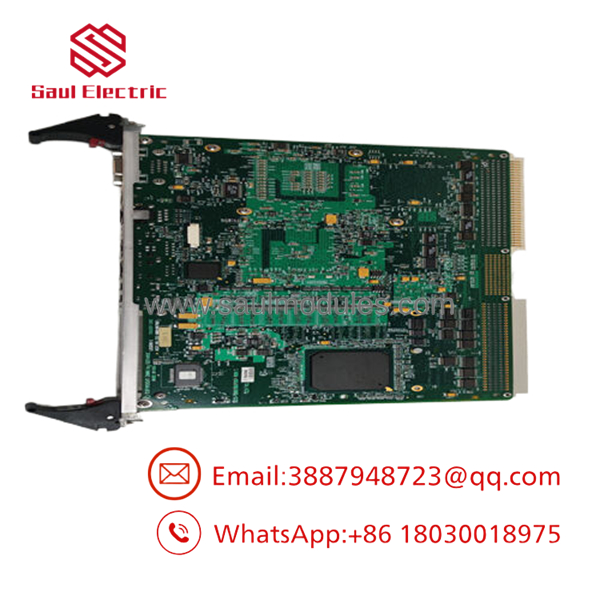
- VMIVME-7807
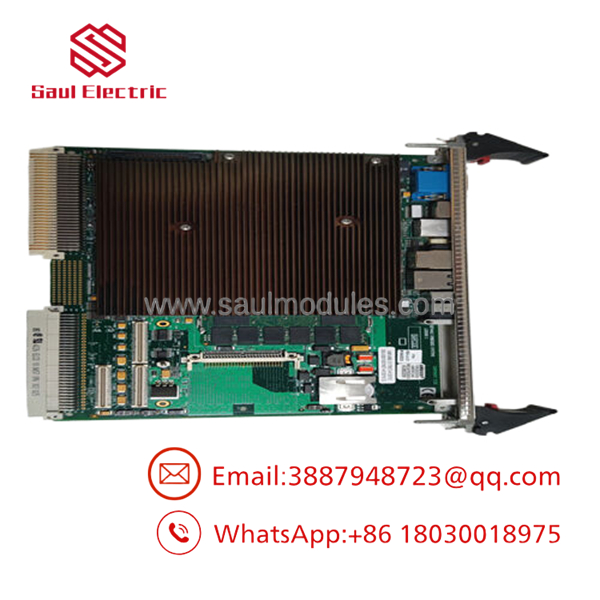
- VMIVME-7807
Frequently Asked Questions (FAQ)
Q: Can I use standard, non-ECC consumer laptop RAM to replace or upgrade the SODIMM memory?
A: To be honest, attempting this is a major gamble that usually ends in stability failures. The VMIVME-7807 is highly selective regarding memory density, bank mapping, and timing profiles dictated by the Intel 855GME memory controller. While standard unbuffered non-ECC modules might allow the BIOS to post, running data-heavy real-time applications will frequently result in random memory exceptions or bus errors. For deterministic operations, always source industrial-grade memory modules that explicitly match the original hardware configuration.
Q: How does the COM1 port work on the front panel? It looks like a standard network jack.
A: That is correct; it uses an RJ45 physical layout instead of a bulky DB9 to fit the single-slot 4HP front panel template. However, it transmits standard RS-232 serial signals. Do not plug an Ethernet patch cable from a network switch into the COM1 port, as doing so can damage the serial transceiver chip. You must use an RJ45-to-DB9 adapter cable configured specifically for VMIC single-board computers to link this interface to a standard PC terminal.
Q: Can this module be hot-swapped while the VME chassis is active?
A: Absolutely not. The standard VMIVME-7807 does not utilize the specialized VME64x live-insertion hardware framework. Pulling the module while +5 VDC power is running across the backplane will create sudden power-rail disruptions, causing data corruption for every card in the rack, and potentially frying the pins on the Tundra Universe II bridge interface. Power down the entire rack enclosure completely before extracting the card.
Q: What is the purpose of the 32 KB nonvolatile SRAM, and how long does it retain data?
A: The 32 KB NVRAM functions independently of the volatile main system memory banks. It is designed to preserve critical machine states, custom axis alignments, or software licensing keys during unannounced power failures. It utilizes an internal lithium cell power source integrated directly into the module’s component layout. Under normal room temperature conditions, this specialized cell maintains data integrity for up to 10 years without requiring external power input.
Q: What is your exact engineering quality protocol for checking these surplus boards prior to distribution?
A: We do not rely on superficial, basic tests. Each board undergoes full testing: we mount it into an active 6U VME chassis running full master/slave peripheral cards, populate the CompactFlash card slot with a test operating system, and boot the unit. We execute dedicated diagnostic utilities that test all 1.5 GB of memory, run continuous read/write cycles across the Tundra Universe II chip to confirm VMEbus control stability, link up both the 10/100 and twin Gigabit Ethernet lines to an active network hub, and monitor thermal performance under maximum processor load for 24 hours. The board is only passed to an ESD-safe anti-static bag once all diagnostic logs return clear, and we include a printout of the test confirmation inside the shipping container.

 Start Chat


