





Description
Key Technical Specifications
| Parameter | Value |
|---|---|
| Manufacturer | GE Intelligent Platforms / Emerson |
| Model Number | IC695CRU320-EJ |
| Product Type | PACSystems RX3i Redundancy CPU |
| Processor | 1 GHz Intel Celeron-M |
| User Memory | 64 MB battery-backed RAM |
| Non-Volatile Memory | 64 MB Flash |
| Redundancy | Hot Standby (HSB) CPU Redundancy |
| Switchover Time | Maximum one logic scan, minimum 3.133 ms |
| Serial Ports | 1 × RS-232, 1 × RS-485 |
| Programming Software | Proficy Machine Edition (PME) |
| Supported Languages | Ladder Diagram, Structured Text, Function Block Diagram, C |
| Backplane | RX3i PCI bus and High-Speed Serial Bus |
| Operating Temperature | 0 °C to 60 °C |
| Redundancy Link | Supports up to two IC695RMX128/228 Memory Xchange modules |
Product Introduction
The GE IC695CRU320-EJ is a PACSystems RX3i Redundancy CPU engineered for high-availability industrial control systems. It performs real-time machine and process control while supporting Hot Standby (HSB) redundancy, allowing a backup controller to assume operation with minimal interruption if the primary controller fails.
This controller is widely deployed in power generation, water treatment, oil and gas, and continuous-process manufacturing where unplanned downtime is unacceptable. Before installation, verify the firmware revision, Proficy Machine Edition version, redundancy hardware, and CPU hardware revision to maintain compatibility with the existing system.
Troubleshooting Quick Reference
| Symptom | Possible Cause | Relevance to this Part | Quick Check Method | Recommendation |
|---|---|---|---|---|
| CPU will not start | Rack power supply failure | ❌ Low | Measure +3.3 V DC and +5 V DC backplane voltages | Verify power supply before replacing CPU |
| SYS FLT LED illuminated | Internal CPU diagnostic fault | ✅ High | Review CPU fault table using PME | Replace CPU only after confirming external hardware |
| Backup CPU will not synchronize | Redundancy link failure | ✅ High | Verify IC695RMX128/228 status LEDs and cabling | Inspect redundancy hardware before replacing CPU |
| Unexpected switchover | Firmware mismatch | ✅ High | Compare firmware revisions of both CPUs | Install matching firmware versions |
| Communication failure | Incorrect serial configuration | ❌ Low | Verify RS-232/RS-485 settings | Correct communication parameters |
| CPU repeatedly resets | Power instability | ✅ Medium | Monitor rack voltage during startup | Inspect power supply and backplane |
| Logic download fails | PME compatibility issue | ✅ Medium | Verify PME version against firmware | Upgrade or downgrade software as required |
Technical Note: Most reported CRU320 failures are eventually traced to redundancy synchronization, firmware incompatibility, or power quality rather than defective CPU hardware. Before replacing the module, collect the CPU fault table, firmware revision, redundancy status, and LED indications.
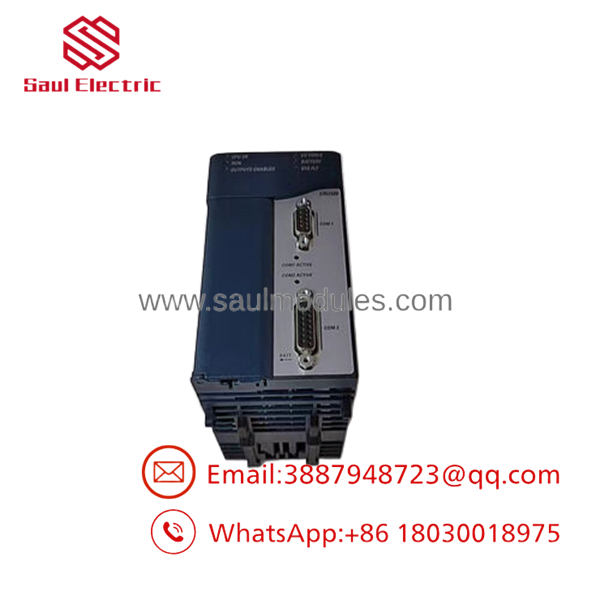
- IC695CRU320-EJ

- IC695CRU320-EJ
Frequently Asked Questions (FAQ)
Q1. What is the IC695CRU320-EJ used for?
It is a Hot Standby Redundancy CPU for the PACSystems RX3i platform. It allows two controllers to operate as an active/backup pair, minimizing downtime if one controller fails.
Q2. Does this CPU support bumpless controller switchover?
Yes.
When properly configured with compatible redundancy hardware, the controller supports bumpless switchover, with transfer occurring within one logic scan.
Q3. Can I use this CPU without redundancy?
No.
The IC695CRU320 is specifically intended for Hot Standby redundancy applications. For standard RX3i control systems, other CPU models such as the CPE series are generally more appropriate. Verify your project requirements before ordering.
Q4. Which communication interfaces are built into the CPU?
The controller includes one RS-232 port and one RS-485 port supporting protocols such as SNP, Serial I/O, and Modbus RTU. Ethernet communication is provided through compatible RX3i communication modules.
Q5. Why is New Surplus inventory less expensive than factory supply?
New Surplus inventory typically comes from canceled automation projects, OEM excess inventory, or unused maintenance stock. The hardware has not been placed into production service but is no longer part of regular factory production.
Q6. What should I verify before ordering?
Verify:
- Exact model (IC695CRU320-EJ)
- Firmware revision
- Hardware revision
- Proficy Machine Edition version
- IC695RMX128/228 compatibility
- Rack configuration
- Auxiliary battery condition
Matching these items before installation prevents most commissioning problems.
Q7. What warranty is typically available?
Most industrial automation suppliers provide a 12-month warranty for verified New Surplus or professionally tested CPUs. Request the power-on test report, firmware verification, and serial-number photographs before shipment.
Quality Inspection & Testing SOP
1. Inbound Inspection & Traceability
- Verify OEM labels, serial numbers, hardware revision, and manufacturing markings.
- Inspect connectors, PCB, and enclosure for corrosion, impact damage, scratches, UV discoloration, or repair evidence.
- Confirm anti-counterfeit identification where applicable.
- Record serial numbers for complete traceability.
2. Live Functional Testing
- Install the CPU in an in-house PACSystems RX3i redundancy test rack.
- Verify the complete boot sequence and diagnostic LEDs.
- Establish synchronization with an IC695RMX128/228 Memory Xchange Module.
- Download and execute a Proficy Machine Edition test application.
- Verify serial communications and redundancy switchover.
- Operate continuously for more than 24 hours while monitoring processor temperature and synchronization stability.
- Generate a documented functional test report.
- Test photos and videos are available upon request.
3. Electrical Parameter Testing
- Perform insulation resistance testing using a 500 V Megger where applicable.
- Verify chassis ground continuity.
- Measure operating current with a calibrated Fluke 115 digital multimeter.
- Confirm stable operation throughout the burn-in period.
4. Firmware & Configuration Verification
- Record firmware revision.
- Verify PME compatibility.
- Confirm redundancy firmware matches the paired CPU.
- Photograph identification labels before shipment.
5. Final QC & Packaging
- Final QC approval.
- Package inside an ESD-safe bag.
- Protect with anti-static foam, bubble wrap, and a heavy-duty corrugated carton.
- Apply a dated QC Passed label.
Technical Pitfalls & Survival Guide
❗ Firmware Must Match on Both CPUs
I’ve seen an entire redundancy system refuse to synchronize because one controller was running an earlier firmware revision.
Before replacing a CPU, record the firmware on both controllers and install matching revisions.
❗ Don’t Ignore the Memory Xchange Module
The CPU is only one part of a redundancy system.
A faulty IC695RMX128 or IC695RMX228, damaged fiber connection, or configuration error can look exactly like a CPU failure.
❗ Verify PME Version
Older versions of Proficy Machine Edition may not fully support newer firmware releases.
Confirm software compatibility before downloading a project to the replacement CPU.
❗ Check Rack Power Under Load
Measure the +3.3 V DC and +5 V DC backplane supplies while the controller is running.
Leave at least a 20% power margin. Voltage sag during startup can cause synchronization failures and unexpected controller resets.
❗ Electrostatic Discharge (ESD)
Always wear a grounded wrist strap.
I’ve watched a technician install a replacement redundancy CPU immediately after removing it from its packaging without ESD protection. The controller appeared normal during power-up but developed intermittent synchronization faults that took hours to diagnose.
Keep these checks in mind and you’ll eliminate most redundancy startup issues, avoid unnecessary CPU replacements, and reduce downtime in high-availability control systems.





 Start Chat


