





Description
Key Technical Specifications
| Parameter | Value |
|---|---|
| Manufacturer | GE Energy |
| Model Number | IS420ESWBH3A |
| Product Type | Industrial IONet Ethernet Switch |
| Platform | Mark VIe / Mark VIeS Speedtronic |
| Copper Ports | 16 × 10/100Base-TX RJ-45 |
| Fiber Ports | None |
| Ethernet Standards | IEEE 802.3, 802.3u, 802.3x |
| Power Input | Dual redundant 24/28 V DC |
| Maximum Current | 1 A |
| Cooling | Fanless, convection cooled |
| Mounting | DIN rail (mounting clip required) |
| Operating Temperature | -40 °C to +70 °C |
| Storage Temperature | -40 °C to +85 °C |
| Hazardous Area Rating | Class I Div 2, Class 2 Zone 2, ATEX |
| Corrosion Rating | G3 compliant |
The H3A version provides 16 copper Ethernet ports and no fiber ports, making it suitable for all-copper IONet installations.
Product Introduction
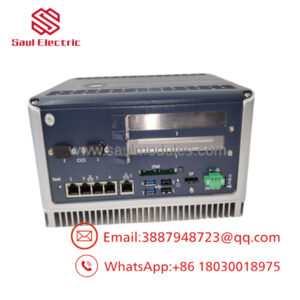
The GE IS420ESWBH3A is a 16-port Industrial Ethernet IONet Switch developed for the GE Mark VIe and Mark VIeS Speedtronic turbine control platform. It provides deterministic network communication between controllers, I/O packs, engineering workstations, and operator interfaces across the IONet control network.
The switch features sixteen 10/100Base-TX copper ports, dual redundant 24/28 V DC power inputs, fanless convection cooling, and DIN rail mounting. The H3A configuration contains no fiber interfaces, making it appropriate for copper-based cabinet networks. Verify the network architecture before replacing an existing switch to avoid communication interruptions.
Troubleshooting Quick Reference
| Symptom | Possible Cause | Relevance to this Part | Quick Check Method | Recommendation |
|---|---|---|---|---|
| Entire IONet offline | Loss of switch power | ✅ High | Measure both 24/28 V DC power inputs | Restore power before replacing the switch |
| Several devices lose communication | Ethernet cable failure | ❌ Low | Test cables and observe Link LEDs | Replace damaged cables first |
| One port inactive | Faulty RJ-45 connector | ✅ Medium | Move the device to another port | Inspect the connector before replacing the switch |
| Network intermittently disconnects | Loose power terminal | ✅ Medium | Verify terminal torque and monitor voltage | Correct wiring and retest |
| Controller cannot communicate | Incorrect network topology | ❌ Low | Verify IONet cable routing and addressing | Correct network configuration |
| No LEDs illuminated | Internal power failure | ✅ High | Confirm redundant supply voltage is present | Replace the switch after verifying power |
| Excessive packet loss | Network overload or hardware fault | ✅ Medium | Review controller diagnostics and LED activity | Isolate traffic before replacing hardware |
Technical Note: The IS420ESWBH3A has a high reliability rating. Most communication failures originate from damaged Ethernet cables, loose RJ-45 connectors, incorrect network topology, or loss of redundant power rather than switch failure.
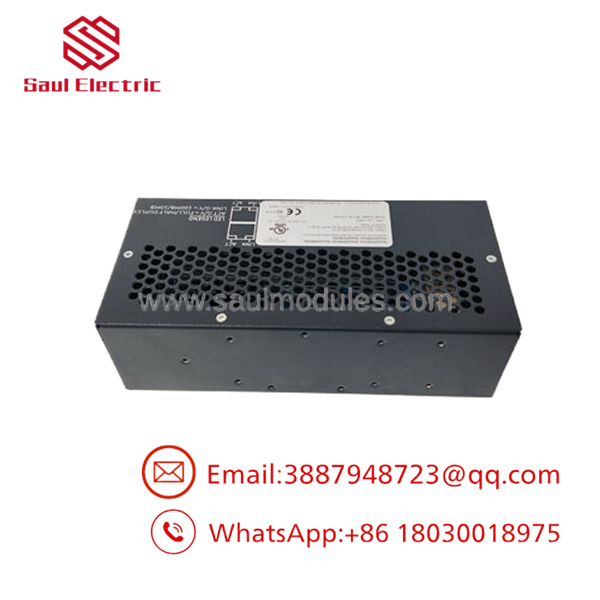
- IS420ESWBH3A
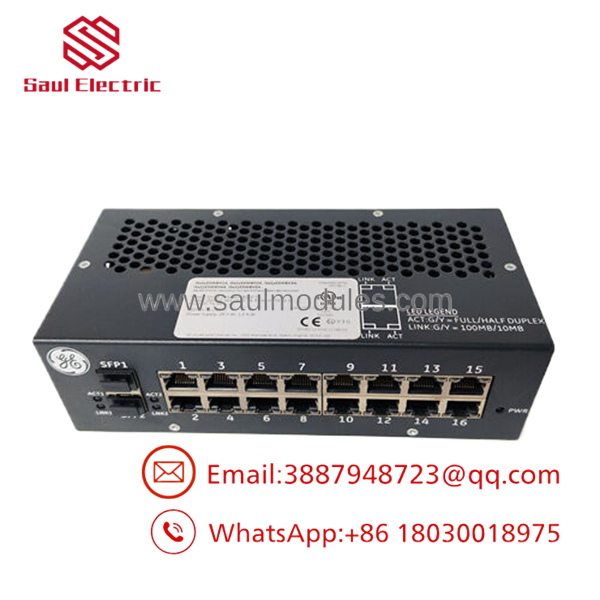
- IS420ESWBH3A
Frequently Asked Questions (FAQ)
Q1. What is the IS420ESWBH3A used for?
The is a 16-port Industrial Ethernet IONet Switch used in GE Mark VIe and Mark VIeS control systems. It interconnects controllers, I/O packs, HMIs, and engineering workstations across the plant control network.
Q2. Does the H3A model include fiber ports?
No.
The provides 16 copper RJ-45 ports and no fiber ports. If your installation requires fiber communication, another ESWB hardware variant should be selected.
Q3. Does the switch support redundant power?
Yes.
It accepts two independent 24/28 V DC power inputs. If one supply fails, the remaining source continues operating the switch, increasing network availability.
Q4. Is this a managed Ethernet switch?
No.
The operates as an industrial unmanaged IONet switch specifically designed for GE control networks. Configuration is intentionally simple to support deterministic control communication.
Q5. Why is New Surplus inventory less expensive than factory inventory?
Most New Surplus switches originate from canceled turbine projects, unused OEM spare inventories, or maintenance stock. They have not been installed in production service but are no longer part of normal procurement channels.
Q6. What should I verify before ordering?
Verify:
- Exact model number ()
- Mark VIe or Mark VIeS compatibility
- Required number of Ethernet ports
- Copper-only network architecture
- DIN rail mounting hardware
- Redundant 24/28 V DC power availability
- Existing cabinet layout
Q7. What warranty is typically available?
Most industrial automation suppliers provide a 12-month warranty on verified New Surplus or professionally tested units. Request serial-number photographs, burn-in test reports, and functional test documentation before shipment.
Quality Inspection & Testing SOP
1. Inbound Inspection & Traceability
- Verify OEM labels, serial numbers, manufacturing identification, and hardware revision.
- Inspect RJ-45 ports, power terminals, housing, and DIN rail clips for damage.
- Check for corrosion, repair marks, cracked connectors, or overheating.
- Record serial numbers for complete traceability.
2. Live Functional Testing
- Install the switch in an in-house GE Mark VIe network test rack.
- Apply redundant 24/28 V DC power supplies.
- Verify startup LED sequence.
- Test all 16 Ethernet ports using calibrated network analyzers.
- Verify auto-negotiation, link status, and data transmission.
- Perform continuous operation for more than 24 hours under network traffic.
- Generate a documented functional test report.
- Test photos and videos are available upon request.
3. Electrical Parameter Testing
- Perform insulation resistance testing where applicable using a 500 V Megger.
- Verify protective ground continuity.
- Measure both redundant power inputs using a calibrated Fluke 115 digital multimeter.
- Confirm stable voltage during full network loading.
4. Firmware & Configuration Verification
- Record hardware revision and identification labels.
- Verify LED operation.
- Confirm all Ethernet ports initialize correctly.
- Document inspection results before shipment.
5. Final QC & Packaging
- QC engineer approval.
- Seal the switch in an ESD-safe bag.
- Protect with anti-static foam, bubble wrap, and a heavy-duty corrugated carton.
- Apply a dated QC Passed label.
Technical Pitfalls & Survival Guide
❗ Verify the Correct ESWB Variant
I’ve seen technicians order an H3A switch for a cabinet that required fiber uplinks.
The H3A version is copper-only. If your original switch uses LC fiber connectors, this is not the correct replacement.
❗ Don’t Ignore Redundant Power
One missing DC supply won’t necessarily stop the network, but it removes redundancy.
Measure both power inputs before assuming the switch has failed.
❗ Label Every Ethernet Cable
Sixteen nearly identical RJ-45 ports make cable mix-ups surprisingly common.
Take clear photographs before disconnecting anything. Swapping IONet cables can create controller communication alarms that resemble hardware failure.
❗ Check Link LEDs Before Replacing Hardware
A dark Link LED often points to a failed cable or disconnected device—not a defective switch.
Verify cable integrity with a network tester before ordering a replacement.
❗ Electrostatic Discharge (ESD)
Always wear a grounded wrist strap.
I once watched a technician install a replacement network switch directly after removing it from its packaging during a dry winter outage. The switch powered up immediately, but one Ethernet port became intermittent after several days of operation. Static damage doesn’t always cause immediate failure.
Keep these checks in mind and you’ll eliminate most IONet communication problems, avoid unnecessary switch replacements, and reduce turbine control system downtime.

 Start Chat


