





Description
3. Key Technical Specifications
- Product Type: Hardened Managed Ethernet Switch
- Form Factor: 19-inch rack-mountable
- Power Supply: Dual AC inputs (model-specific configuration)
- Ports: Configurable fiber ST and RJ45 copper interfaces (up to 24 ports depending on modules)
- Operating Temperature: Substation/industrial hardened range
- Management: Full managed Layer 2/3 capabilities
- Mounting: Rack mount with secure hardware
- Environment: Designed for harsh substation and industrial conditions
- Redundancy: Supports network redundancy protocols
- Connectivity: Multiple 10/100/1000 Mbps ports with fiber options
- Dimensions: Standard 19″ rack width
4. Product Introduction & Supply Chain Strategy
The GE ML2400-F-AC-XX-A6-A4-XX-XX-X is a MultiLink hardened managed Ethernet switch built for substation and industrial environments. It delivers reliable network communications for critical infrastructure, supporting a mix of fiber and copper ports with advanced management features for secure data transmission in harsh conditions.
Selecting New Surplus inventory for this switch balances capital efficiency with high availability. Network components like the ML2400 often face lifecycle challenges, making buffer stock essential to avoid extended lead times or stock-outs during outages. This approach reduces Total Cost of Ownership compared to full OEM purchases while steering clear of refurbished risks that could compromise substation reliability and cybersecurity posture.
5. Installation & Configuration Guide
Stage 1: Pre-Installation (Prep & Safety) Lock-out and tag-out power sources. Use an ESD wrist strap. Document the existing switch configuration, port mappings, IP settings, and cable connections with photos. Review the specific port module configuration (A6-A4).
Stage 2: Removal De-energize the unit. Disconnect all network cables and power cords. Remove the switch from the 19″ rack by loosening mounting screws or rails.
Stage 3: Installation (Clone & Seat) Install the new ML2400-F-AC-XX-A6-A4-XX-XX-X into the rack and secure it. Connect power supplies and replicate port cabling exactly. Match any DIP or configuration settings from the old unit.
Stage 4: Power-On & Testing Apply AC power and monitor boot LEDs. Access the management interface via console or Ethernet to verify IP configuration, firmware, and port status. Test network connectivity and redundancy features before full service restoration.
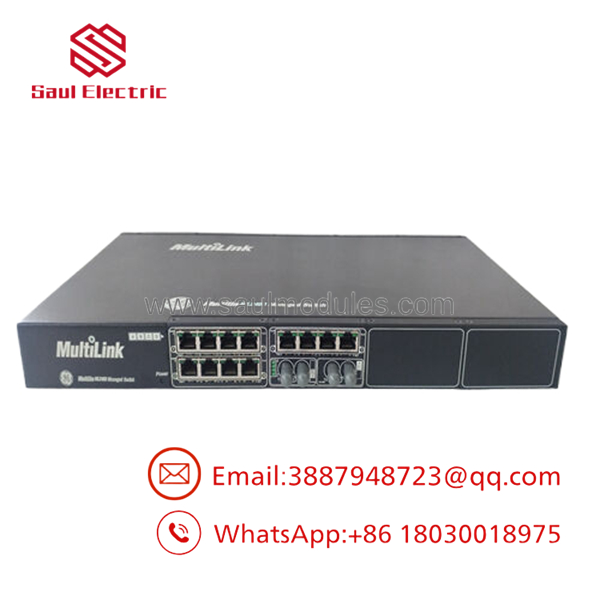
- ML2400-F-AC-XX-A6-A4-XX-XX-X
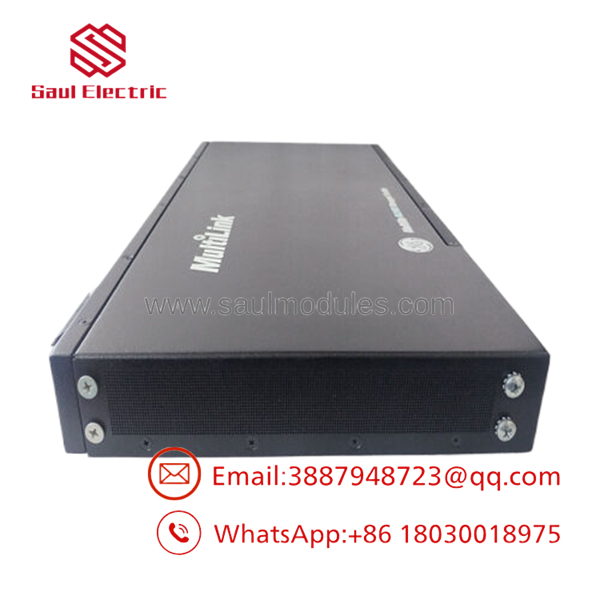
- ML2400-F-AC-XX-A6-A4-XX-XX-X
6. Firmware/Software Versions & Upgrade Notes
Load the firmware version compatible with your existing ML2400 network topology. Check GE documentation for the recommended revision for your specific hardware configuration.
Firmware updates can introduce new security features but may require reconfiguration of VLANs or redundancy settings. Avoid mixing significantly different firmware versions across the network to prevent compatibility issues. Always back up the current configuration before any upgrade or hardware replacement.
7. Frequently Asked Questions (FAQ)
Q: Is this ML2400-F-AC-XX-A6-A4-XX-XX-X New Surplus? Yes. It is a genuine New Surplus unit from authorized channels, complete with original packaging and verification. We perform functional checks but supply it as new OEM stock.
Q: Why choose New Surplus over refurbished switches? Refurbished units risk latent failures in power supplies or port modules that can take down critical networks. New Surplus provides full expected service life and better cybersecurity integrity at a lower cost than current OEM pricing.
Q: What are the risks with refurbished network equipment? Aging components in power modules or Ethernet ports can cause intermittent failures or security vulnerabilities. In substation applications, this leads to communication loss that impacts protection and control systems far beyond the initial purchase savings.
Many legacy MultiLink switches face lifecycle management. Maintaining strategic buffer stock of New Surplus units helps ensure continuity without excessive inventory carrying costs.
Q: Does this switch support hot-swapping in redundant setups? The supports redundant power but full hot-swap of the chassis is not standard. Plan for brief network impact and test redundancy protocols after installation.
Q: What warranty is included? We offer a 1 year warranty on this New Surplus unit, backed by QC verification and traceability documentation.
Q: How do I transfer the configuration to the new switch? Export the configuration file from the old unit via the management software. Load it onto the new switch after firmware alignment. Verify all port settings and network protocols match the original setup.

 Start Chat


