





Description
Product Introduction & Engineering Value
The GT1555-VTBD is a compact Mitsubishi GOT1000 operator terminal designed for machine and process visualization. Its 5.7-inch high-brightness, wide-viewing-angle TFT display provides 640 × 480 VGA resolution and 65,536-color graphics, while the touchscreen provides direct operator interaction with the HMI project.
This is a legacy GOT1000 unit, so replacement planning should include the existing GT Designer software version, project file, communication interface, and installed option hardware. Mitsubishi’s manual lists GT Designer3 compatibility for the GT1555-VTBD and provides specific interface and expansion provisions.
Technical Specifications
| Parameter | GT1555-VTBD |
|---|---|
| Manufacturer | Mitsubishi Electric |
| Product Family | GOT1000 |
| Series | GT15 |
| Display Type | TFT color LCD |
| Screen Size | 5.7 in |
| Resolution | 640 × 480 pixels, VGA |
| Display Colors | 65,536 |
| Display Area | 115 × 86 mm |
| Viewing Angle | Left/right 80°, top 80°, bottom 70° |
| Brightness | Approx. 350 cd/m² |
| Touch Panel | Matrix resistive |
| Touch Points | Up to 2 simultaneous points |
| Supply Voltage | 24 VDC |
| Built-in Flash | 9 MB |
| RS-232 | 1 channel |
| USB | Full-Speed 12 Mbps, Mini-B |
| CF Card Slot | 1 |
| Option Function Board | 1 slot |
| Extension Unit | 1 slot |
| External Dimensions | 167 × 135 × 56 mm* |
| Panel Cutout | 153 × 121 mm |
| Weight | Approx. 1.1 kg |
| Front Protection | IP67-class protection |
*Dimensions vary slightly between documentation revisions depending on whether the USB environmental protective cover is included. Mitsubishi’s user manual gives 167 × 135 × 56 mm excluding the USB environmental protective cover.
Communications & Service Interfaces
The GT1555-VTBD provides an RS-232 interface with a 9-pin D-sub connector. Mitsubishi specifies selectable communication speeds from 4,800 to 115,200 bps. A Mini-B USB interface provides PC connectivity for project-data transfer, OS installation, and FA transparent functions.
The unit also provides a Type 1 CompactFlash slot for data transfer, data storage, and GOT startup functions. Mitsubishi specifies FAT16 support up to 2 GB for the documented CF interface.
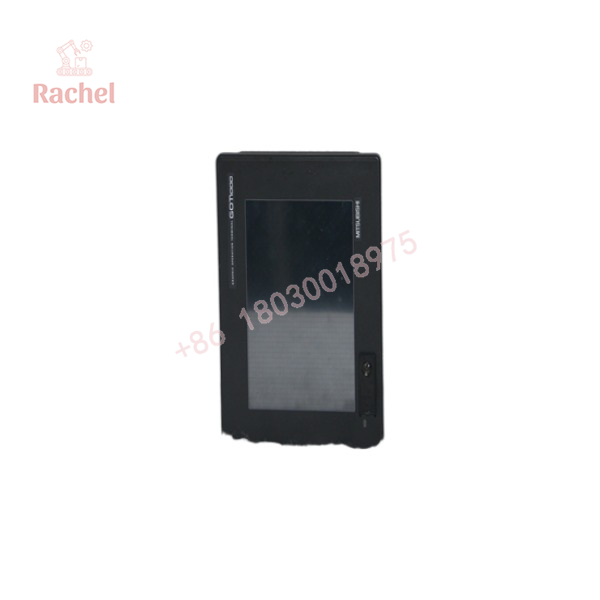
GT1555-VTBD
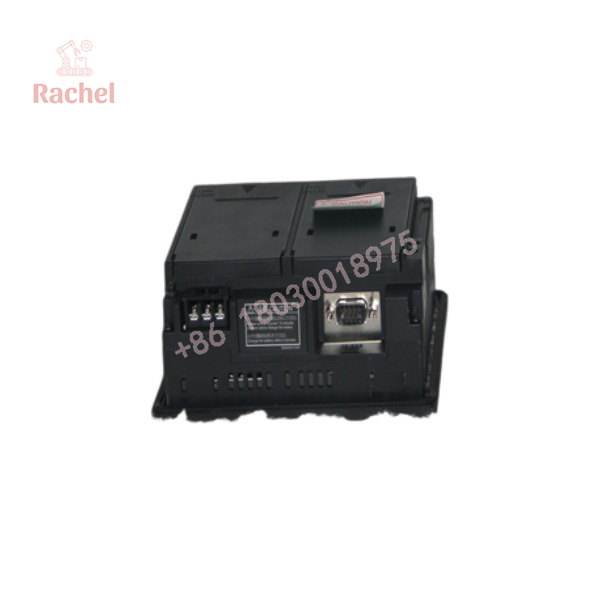
GT1555-VTBD
Field Application & the “Trench” Experience
A GT1555-VTBD failure rarely means the machine’s PLC program has disappeared. More often, the operator station has developed a dead touch area, failing backlight, damaged LCD, or communication problem. The machine may still be running, but operators lose the interface needed to monitor alarms, change setpoints, or issue commands.
That is why keeping an exact GT1555-VTBD spare can be useful on an older GOT1000 installation. The replacement process is much easier when the original project file and communication settings have already been backed up.
Typical applications include:
- Packaging-machine operator stations
- Machine-tool HMI panels
- Conveyor and material-handling control interfaces
- Legacy PLC-based process equipment
Transparency SOP: QA & Testing
For New Surplus or Refurbished GT1555-VTBD stock, the touchscreen and display deserve as much attention as the electronics.
Hardware inspection
- Check the LCD for dead pixels, discoloration, pressure marks, and uneven illumination.
- Inspect the touchscreen surface for scratches or delamination.
- Examine the front bezel, mounting hardware, connectors, and rear cover.
Power test
- Apply the specified 24 VDC supply.
- Verify normal boot behavior.
- Check display brightness and image stability.
Touch test
- Test the entire touchscreen surface.
- Verify all operator keys and screen objects respond correctly.
- Check for dead zones or unintended touch registration.
Communication test
- Verify RS-232 communication where appropriate.
- Test USB project-transfer functionality.
- If possible, connect the terminal to a compatible Mitsubishi PLC/controller and run a representative GOT project.
Memory/project test
- Verify that the terminal can accept and execute a compatible project.
- Confirm that the CF interface and internal memory functions operate normally.
The Veteran’s Tech Trap Guide
⚠️ Trap #1 — Confusing GT1555-VTBD with GT1555-QTBD.
Both are 5.7-inch color GOTs, but the VTBD is VGA 640 × 480, while the QTBD is QVGA 320 × 240. They are not equivalent HMI specifications.
⚠️ Trap #2 — Assuming the project will automatically transfer.
The hardware replacement does not guarantee project compatibility. Mitsubishi identifies specific GT Designer software versions for GT1555-VTBD. Preserve the existing project file and software environment before replacing the terminal.
⚠️ Trap #3 — Forgetting the battery.
The GT15 platform uses an optional GT15-BAT lithium battery for backed-up clock and maintenance-time data. Mitsubishi gives an approximate five-year battery life at 25 °C.
PRO TIP: Before removing the failed terminal, photograph the rear label, option boards, communication wiring, and screen configuration. Also make a complete project backup. The HMI hardware is only half of the replacement problem.
Dynamic FAQ
What is the Mitsubishi GT1555-VTBD?
It is a 5.7-inch GOT1000 graphic operation terminal/HMI with a TFT color LCD, VGA 640 × 480 resolution, 65,536 colors, and 24 VDC power.
What resolution does GT1555-VTBD have?
The uses VGA resolution of 640 × 480 pixels. Its display area is approximately 115 × 86 mm.
Does GT1555-VTBD have Ethernet?
The standard interface specifications documented for this model identify RS-232 and USB, plus a CompactFlash slot and provisions for optional communication/extension hardware. Do not assume that every GT1555-VTBD has an onboard Ethernet port.
What software is used to program GT1555-VTBD?
Mitsubishi’s documentation identifies GT Designer3 as compatible with the GT1555-VTBD and gives the applicable software-version requirements.
Is GT1555-VTBD discontinued?
Yes. Mitsubishi’s product listing identifies the GT1555-VTBD as production-ended, making verified spare inventory particularly relevant for plants maintaining existing GOT1000 installations.
Is New Surplus GT1555-VTBD acceptable?
Yes. For a legacy HMI, New Surplus is generally preferable to an unknown-condition used unit. Confirm that the LCD, backlight, touchscreen, communication ports, and internal memory have been tested.
What warranty should I request?
Request written coverage for display operation, touchscreen response across the full panel, backlight performance, startup, communication interfaces, and project execution. For refurbished units, ask for actual touchscreen and display test results rather than a simple power-on confirmation.

 Start Chat


