





Description
Product Introduction
The Mitsubishi GT1695M-XTBD is a premium 15-inch industrial HMI terminal built as the flagship display platform within the GOT1000 series (GT16 family). Featuring a 1024×768 pixel XGA TFT display supporting 65,536 colors, this panel delivers sharp graphical visualization for complex process screens, trend charts, and high-density alarm summary tables. Powered by a 24VDC supply, it is designed to operate continuously in tough plant environment conditions.
Engineered with extensive built-in connectivity—including high-speed Ethernet, dual serial channels, USB host/device ports, and CF card expansion slots—the GT1695M-XTBD bridges field devices directly to enterprise SCADA systems. It interfaces smoothly with MELSEC series PLCs, third-party controllers, and motion networks. When an aging operator panel fails on a critical production line, replacing it with an identical pre-tested GT1695M-XTBD avoids costly panel cutouts, enclosure metalwork, and project re-engineering.
Key Technical Specifications
| Parameter | Value / Specification |
| Model Number | GT1695M-XTBD |
| Manufacturer | Mitsubishi Electric |
| Display Type & Size | 15.0″ XGA Color TFT LCD |
| Resolution & Colors | 1024 x 768 Pixels |
| Input Supply Voltage | 24 VDC (+10% / -15%) |
| Touch Panel Type | Analog Resistive Film |
| Onboard Interfaces | Ethernet (10BASE-T/100BASE-TX), RS-232, RS-422/485, USB Host/Device |
| Expansion Storage | CompactFlash (CF) Card Slot, Option Interface Units |
| Protection Rating | IP67F / IP65F (Front Panel when mounted correctly) |
| Operating Temperature | 0°C to 55°C (32°F to 131°F) |
Application Scenarios & The “Trench” Experience
We were called to an automotive assembly facility on a night shift when a main chassis welding cell went down. The central 15″ GOT touchscreen went completely black after a power dip, locking operators out of manual tool controls and fault reset screens. The plant was losing thousands of dollars every fifteen minutes while body shells stacked up on the transfer conveyor. Upgrading to a modern GOT2000 panel on short notice meant converting screen projects and modifying panel mounting brackets. Dropping in a bench-verified GT1695M-XTBD, popping in the original CF card, and restoring the program got the entire cell cycling again in less than an hour.
- Automotive Body & Assembly: Providing high-resolution visual feedback for robotic cell status, weld diagnostics, and line interlocks.
- Semiconductor & Electronics: Displaying complex recipes, vacuum chamber metrics, and wafer tracking graphics.
- Food & Beverage Packaging: Centralized operator control for multi-axis packaging, labeling, and palletizing stations.
- Water & Wastewater Treatment: Running graphical scada overview screens for multi-pump stations and filtration skids.
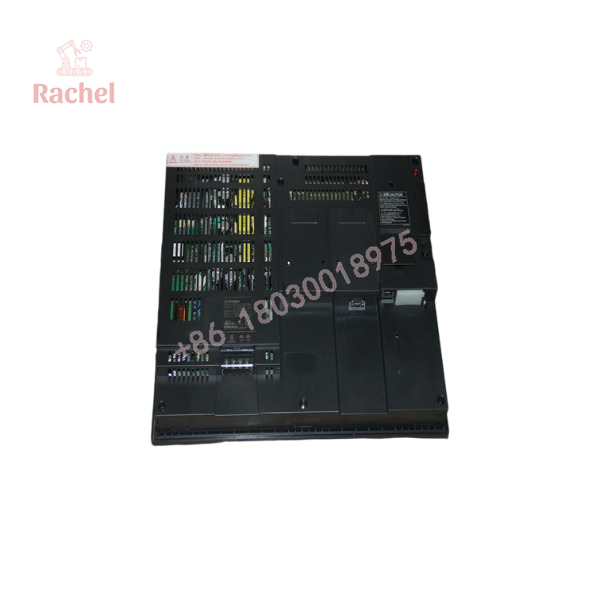
GT1695M-XTBD
Transparency SOP: Quality Assurance & Testing
We do not drop-ship unverified surplus panels. Every Mitsubishi GT1695M-XTBD undergoes a strict 5-step engineering bench check before entering static-shielded storage:
- Inbound Physical Inspection: Inspect the front resistive touch screen for scratches or dead spots, verify rear connector pins, check mounting clip gaskets, and audit OEM labeling.
- Display & Backlight Burn-In Test: Apply 24VDC logic power to test the backlight inverter, checking for screen flicker, uneven color distribution, or dead pixels across the entire 15″ TFT matrix.
- Touchscreen Grid Calibration: Actuate a complete matrix check across all four corners and center points to guarantee precise touch response and zero grid drift.
- Communications Port Diagnostic: Establish live handshakes over Ethernet, RS-232, RS-422/485, and USB ports to verify data transmission with a MELSEC Q-Series test rack.
- Clear & ESD Protective Wrapping: Restore factory initial states (or save client backup project data), clean the bezel assembly, and wrap the unit in ESD anti-static bubble packaging.
The Veteran’s Tech Trap Guide (Crucial Value-Add)
⚠️ Screen Project Resolution Mismatches: If you are migrating a project file from a smaller GOT panel (like a 10.4″ GT1675 or 12.1″ GT1685) to the 15″ GT1695M-XTBD using GT Designer software, do not just dump the file directly into the terminal. Check the project screen resolution settings first; failing to scale graphic objects properly will result in small, unreadable controls tucked into the top-left corner of the XGA display.
❗ Front Gasket & Enclosure Seal Integrity: When replacing a dead terminal on a wet-process or dusty floor, always replace the perimeter rubber mounting gasket. Reusing a crushed or dry-rotted old gasket destroys the IP67F front panel liquid seal, allowing coolant or washdown spray to seep behind the bezel and short out the backlight inverter board.
⚠️ CF Card & Battery Transfer: Do not forget to transfer the system battery and memory card from your dead unit to the replacement GT1695M-XTBD! The onboard real-time clock (RTC) and internal recipe memory rely on the internal lithium battery. If the battery dies or is missing, alarm logs and time-stamped history data will reset every time panel power cycles.
Frequently Asked Questions (FAQ)
Q: Can I replace a GT1695M-XTBD with a newer GOT2000 series HMI?
A: Yes, the GOT2000 series (such as the GT2715) is the official upgrade path. However, retrofitting requires converting the project software file in GT Works3 and verifying panel cutout dimensions, which can delay emergency repairs compared to a direct drop-in replacement.
Q: What is the difference between GT1695M-XTBD and GT1695M-XBA?
A: Power supply requirement. The XTBD model operates on a 24VDC power supply, whereas the XBA model operates on 100-240VAC line power. Wiring line voltage into the 24VDC XTBD terminals will instantly destroy the internal power board.
Q: How do I transfer my application program to a replacement GT1695M-XTBD?
A: You can transfer project data using a standard USB A-to-B cable with GT Designer3 software, via an Ethernet connection over your network, or by transferring the screen data directly via a CompactFlash (CF) memory card.
Q: Are replacement touchscreen overlays and backlights available?
A: Yes. While the GT1695M-XTBD is no longer manufactured by Mitsubishi, individual wear components like replacement backlight modules and protective front films can often be serviced separately.
Q: What warranty comes with this replacement unit?
A: Every Mitsubishi GT1695M-XTBD terminal supplied by us includes a full 12-month operational replacement warranty backed by our engineering test laboratory.

 Start Chat


